|
⇤ ← Revision 1 as of 2022-07-15 09:19:53
Size: 1341
Comment: initial commit
|
← Revision 2 as of 2022-07-18 09:16:16 ⇥
Size: 1472
Comment: added instruction step and edited some places
|
| Deletions are marked like this. | Additions are marked like this. |
| Line 18: | Line 18: |
| *In the section "User variables for user_name" click on "New..." | *In the section "User variables for jane" (replace jane by your account name) click on "New..." |
| Line 20: | Line 20: |
| {{environment_variables.png}} | {{new_environment_variable.png}} |
| Line 24: | Line 24: |
| ** Variable value: {{{C:\Users\user_name\Desktop\kleo-log}}} (replace "user_name" with your own user name) | ** Variable value: {{{C:\Users\user_name\Desktop\kleo-log}}} (replace "user_name" with your own account name) |
| Line 36: | Line 36: |
| * In the window "Environment Variables" click on "OK". \\\\ {{save_env_variables.png}} \\\\\\\\ |
|
| Line 40: | Line 45: |
| * Select the variable "K~LE~O~P~A~T~RA~_L~OG~DIR" | * Select the variable "K~LE~OP~A~TR~A_LOG~OP~TI~ON~S" |
| Line 42: | Line 47: |
| * Repeat the previous steps to delete the other variable "K~LE~OP~A~TR~A_LOG~OP~TI~ON~S" | * Repeat the previous steps to delete the other variable "K~LE~O~P~A~T~RA~_L~OG~DIR" |
| Line 44: | Line 49: |
| {{delete_environment_variable.png}} | {{delete_env_variable.png}} |
Activate logging for Kleopatra
under construction
Result
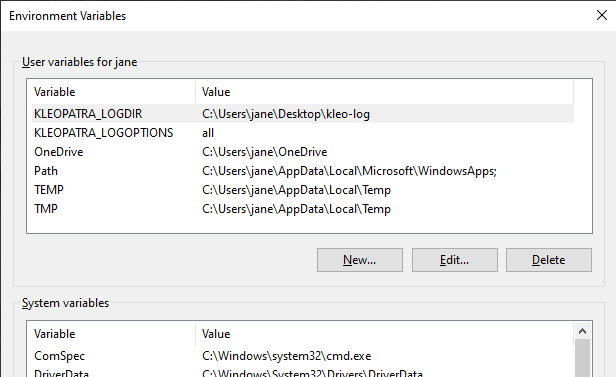
Instructions
1. Create a folder with the name "kleo-log" on the Desktop.
2. Create new environment variables:
- Open the settings
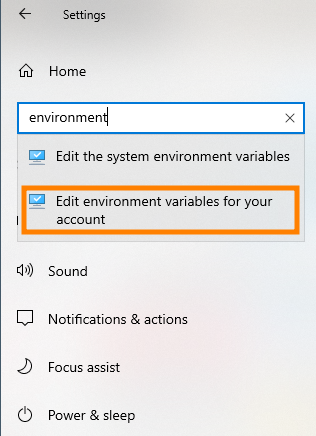
- Enter "environment" in the search bar and click on the suggestion "Edit environment variables for your account".
- In the section "User variables for jane" (replace jane by your account name) click on "New..."
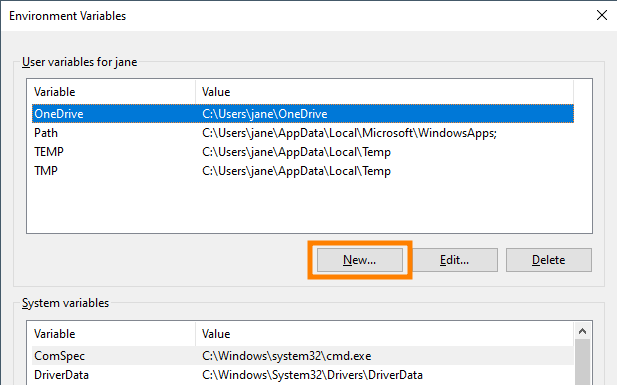
- In the next window enter the following:
- Variable name: KLEOPATRA_LOGDIR
- Variable value: C:\Users\user_name\Desktop\kleo-log (replace "user_name" with your own account name)
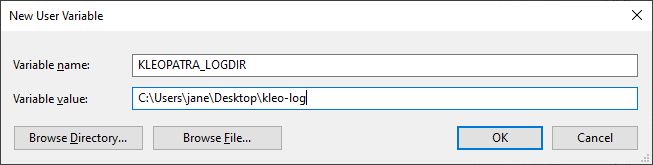
- And click on "OK"
- Again click on "New..." to create the next variable
- Enter the following:
- Variable name: KLEOPATRA_LOGOPTIONS
- Variable value: all
- Confirm with "OK"
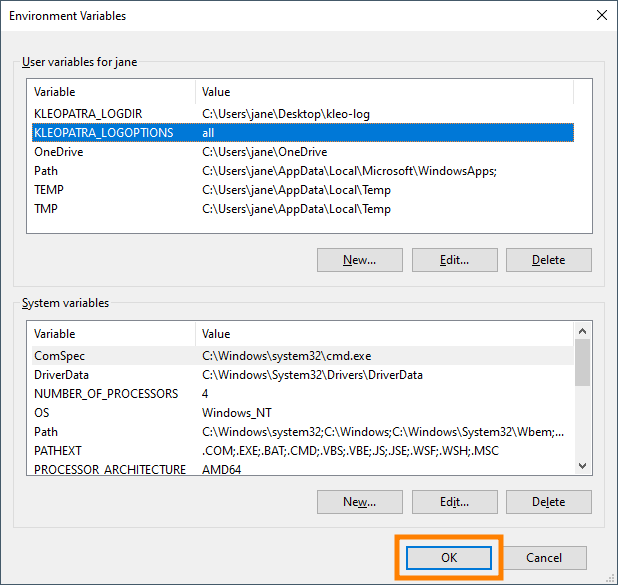
- In the window "Environment Variables" click on "OK".
3. Restart Kleopatra to start the logging
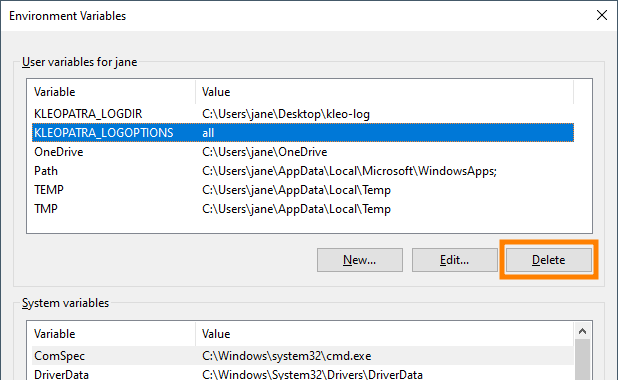
4. Remove the environment variables after solving a problem
- Navigate to the environment variables
- Select the variable "KLEOPATRA_LOGOPTIONS"
- Click on "Delete"
- Repeat the previous steps to delete the other variable "KLEOPATRA_LOGDIR"