|
Size: 1196
Comment: improve formatting
|
Size: 1033
Comment: added end result for instruction
|
| Deletions are marked like this. | Additions are marked like this. |
| Line 15: | Line 15: |
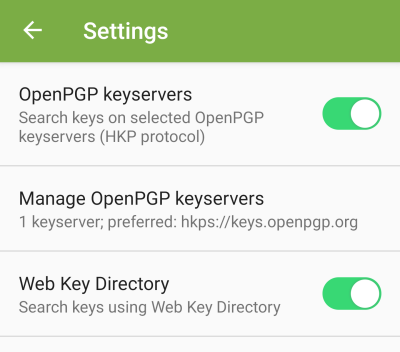
| ===How to enable WKD | ===How to enable WKD (version 5.7.5) ====Result after enabling WKD {{okc_result_after_enabling_wkd.png}} |
| Line 18: | Line 21: |
| {{okc_open_menu_small.png}}\\ [[attachment:okc_open_menu.png|Open larger image]] |
{{okc_open_menu.png}}\\ |
| Line 22: | Line 25: |
| {{okc_open_settings_small.png}}\\ [[attachment:okc_open_settings.png|Open larger image]] |
{{okc_open_settings.png}}\\ |
| Line 26: | Line 28: |
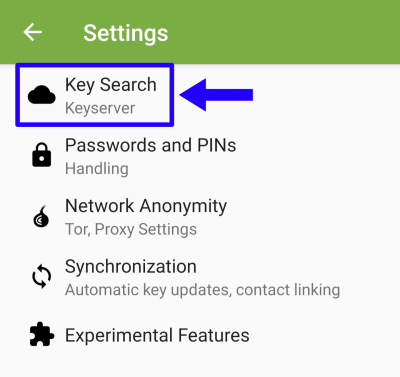
| {{okc_open_settings_keysearch_small.png}}\\ [[attachment:okc_open_settings_keysearch.png|Open larger image]] |
{{okc_open_keysearch_settings.png}}\\ |
| Line 30: | Line 31: |
| {{okc_activate_wkd_small.png}}\\ [[attachment:okc_activate_wkd.png|Open larger image]] |
{{okc_activate_wkd.png}}\\ |
OpenKeyChain

OpenKeyChain is an app that serves as some kind of library to other apps. It can be used to manage OpenPGP-keys and to search for pubkeys. Other apps - like FairEmail or K9Mail - then can access these keys to encrypt emails.
Additional information:
- Started as a continuation of APG.
- Uses a repackaged Bouncy Castle: https://rtyley.github.io/spongycastle/
- Homepage: https://www.openkeychain.org/
- License: GPL 3+ |
- Programming Language: Java
Instructions:
How to enable WKD (version 5.7.5)
Result after enabling WKD
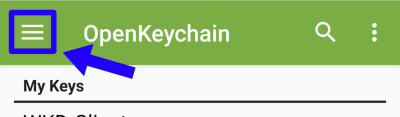
1. Open the menu
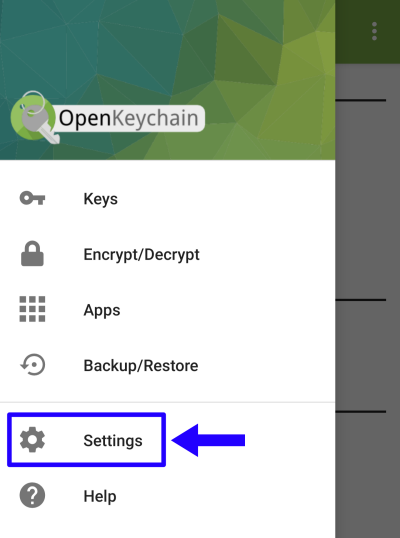
2. Open settings
3. Open settings for the keysearch
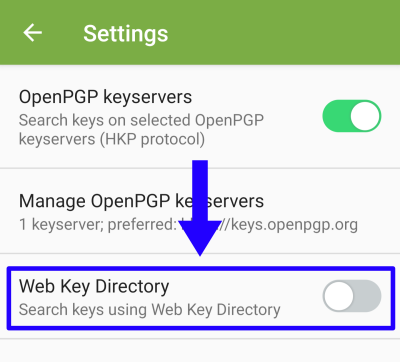
4. Activate WKD